
Property Presentations for Toronto Real Estate Agents
Give buyers a clearer way to explore your listing. Bring your property photos, room details, floor plans and optional 360° views together in one presentation you can share.
Your property content, arranged for buyers.
Arcvist is interactive property presentation software for real estate professionals. Start with the photos and confirmed facts you already have. Choose a design, arrange content by space, then publish a browser-based presentation with its own link.
For an agent working in Toronto, the structure can follow the property: a compact condo with shared amenities, or a house with several floors and outdoor areas. Buyers open the selected main menu and choose what to explore.
A condo presentation
Group living and dining photos together, give each bedroom its own gallery, and add available amenities imagery in a clearly named space. An optional floor plan helps connect the rooms. Label shared amenities so they cannot be mistaken for rooms inside the suite.
A house presentation
Begin with the exterior, then organise the living room, kitchen and bedrooms. Give a garden or terrace its own space when you have photos. Several photographs of one bedroom belong together; different bedrooms deserve separate names.
These are suggested workflows, not customer case studies or active listings.
Preparing a new listing? Use the listing media checklist to review photographs, room groups and optional plans before you build.
From available content to a shareable presentation.
Choose a design
Compare the ten menu designs and check how your choice looks on a phone.
Add available content
Create spaces, upload photos and add the details you can confirm. Plans, panoramas and contact details are optional. You can return to add or change content later.
Preview and share
Review the selected main menu, room galleries and links. Publish when ready, then copy the presentation link.
A Better Way to Showcase Toronto Condos
Keep unit rooms, the actual balcony view and shared building amenities clearly identified. Try the illustrative apartment sample: open a room gallery, follow the supplied 2D plan’s Living & dining link, then check its main menu on mobile.
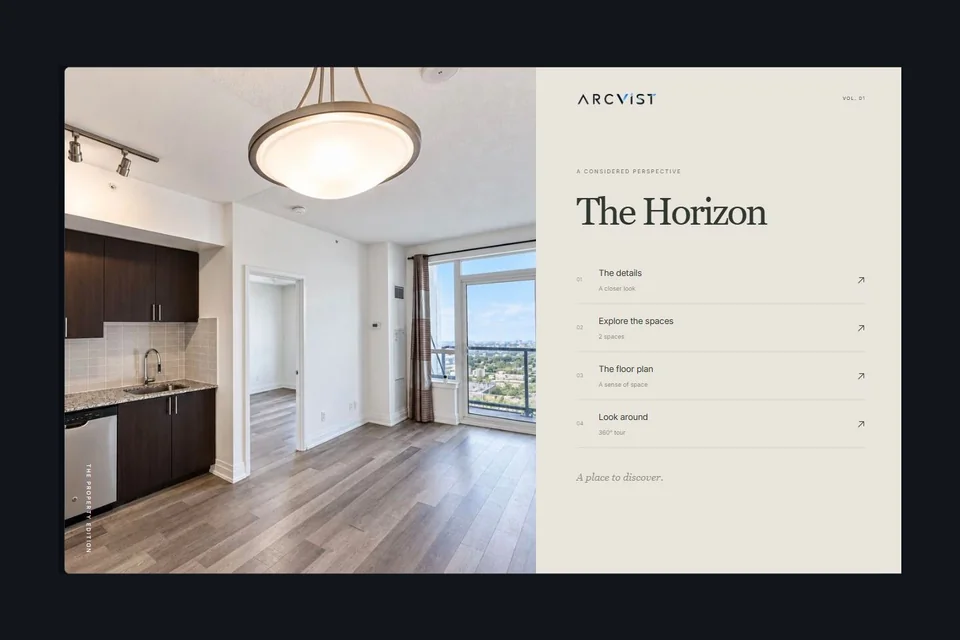
The Horizon is an illustrative demonstration using approved sample imagery, not an active Toronto listing.
Where Arcvist fits in your work.
Use Arcvist to present an individual property to prospective buyers. It brings supplied content into a linked, interactive showcase. A seller-facing listing pitch, a comparative market analysis and a brokerage website serve different jobs.
Arcvist does not provide property valuations, CRM services or automatic MLS syndication. You supply the facts, photography and any plans you want to show. Serving Toronto professionals does not imply a physical Toronto office.
See the presentation workflowBefore you begin.
Do I need a 360° camera to start?
No. Ordinary property photographs are enough for a room gallery. Add genuine panoramic images later if you have them; a standard photograph does not become a 360° capture.
Can I create a presentation without a floor plan?
Yes. Floor plans and all property content are optional. Include the material that helps a buyer understand this property, and leave unavailable sections out.
Can I update a presentation after sharing it?
Yes. Saved changes to an active presentation update the shared version while keeping its link. Wait for saving and media processing to finish, then reopen the link to check the result.
Does sharing a link put my property in Explore?
Publishing a presentation and enabling discovery are separate choices. Review the project’s Explore settings and retain your intended visibility; a shareable link alone is not an instruction to add a directory listing.
Explore the single property website builder or compare an interactive presentation with a PDF brochure.